
WordPress Media Library Security & Spam Protection
Secure your files, block automated downloads, and control who accesses your media. Sigma Media Manager protects your WordPress media library with multi-level password protection, Captcha verification, download rate limiting, and strict upload restrictions — enterprise-grade WordPress media library security without complicated setup.
Why Your WordPress Media Library Needs Built-In Security
By default, any file uploaded to the WordPress Media Library becomes publicly accessible if someone has the URL. This can be a serious problem if you host:
- Premium downloadable assets
- Client documents and proposals
- Private company files and compliance docs
- Member-only resources and course materials
Open media libraries are also frequent targets of automated bots that repeatedly download large files, draining bandwidth and slowing your website.
Sigma Media Manager adds a powerful security layer directly inside WordPress. With password protection, Captcha verification, download rate limiting, and strict upload controls, you gain complete control over who can access your files and how often.
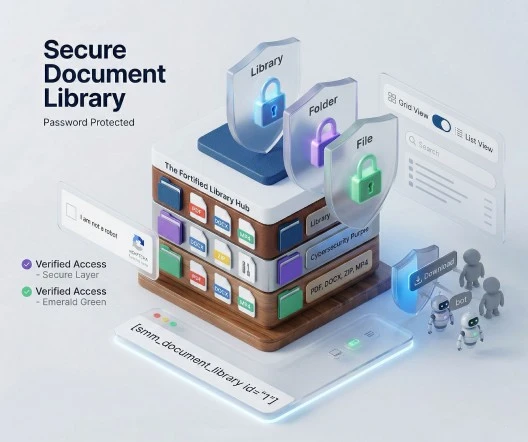
Stop Download Spam with Captcha & Download Rate Limiting
Automated bots can repeatedly download files from your website, wasting bandwidth and overloading your server. Sigma Media Manager prevents this with intelligent download rate limiting combined with human verification.
You can define rules such as: allow 3 downloads per minute — additional downloads require Captcha verification. If users exceed your limit, they must verify they are human before downloading again.
- Multiple Captcha providers: Google reCAPTCHA, Cloudflare Turnstile, hCaptcha
- Configurable download rate limiting per time window
- Brute-force download protection with automatic verification
- Automatic counter reset after the defined time period
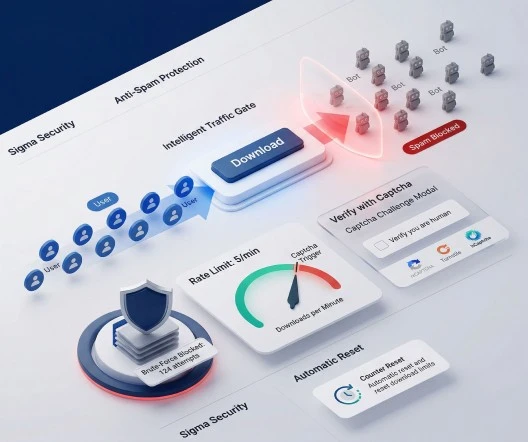
Multi-Level Password Protection for WordPress Files
Protect sensitive documents with granular password protection built directly into your WordPress media workflow. Whether you want to secure a complete resource library, a single client folder, or one confidential document, Sigma Media Manager gives you full control.
Access levels
- Library-level protection — Lock the entire document library with one password
- Folder-level protection — Protect specific folders while keeping the rest of the library public
- File-level protection — Add passwords to individual files for maximum control over premium assets
Visitors simply enter the password on the front end to unlock protected content — clean prompts appear directly within the embedded library.
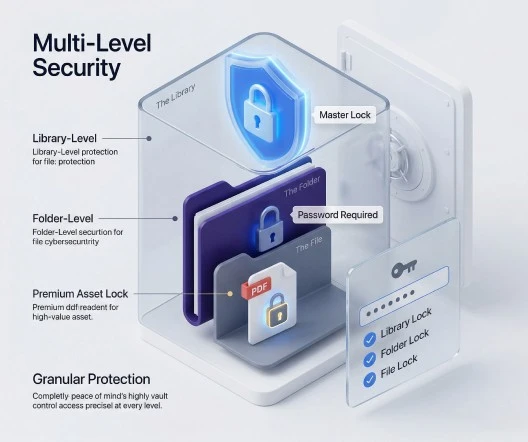
Strict Upload Restrictions & File Type Control
Security starts at the upload stage. If multiple users upload files to your WordPress media library, it is essential to prevent unsafe or unsupported file types from entering your system.
Sigma Media Manager lets you define exactly which file extensions are allowed — keeping your WordPress document library organized and secure.
Upload security features
- File type whitelisting — Specify permitted extensions (e.g. pdf, docx, xlsx, pptx)
- Block dangerous files — Automatically prevent uploads of .php, .js, and other executable scripts
- Workflow-specific libraries — Create libraries that accept only document formats while blocking images and videos
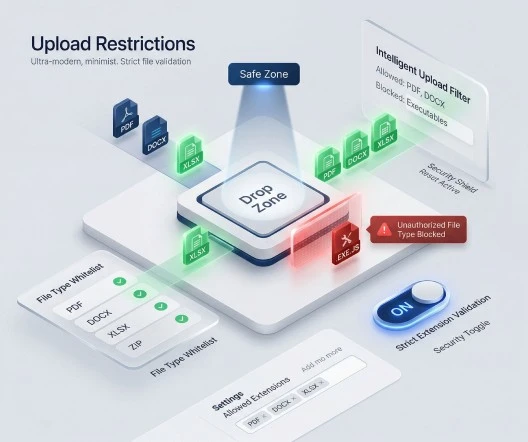
Display Secure Document Libraries Anywhere with Shortcodes
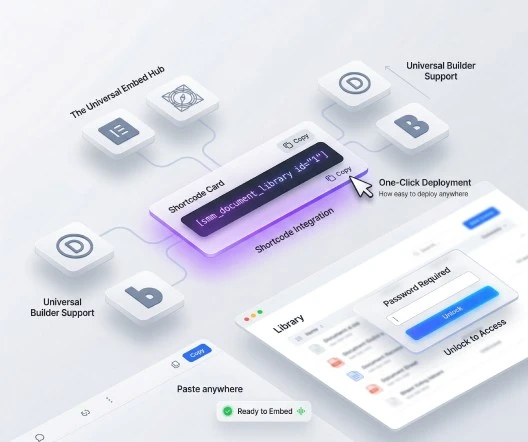
Once your security settings are configured, deploying your WordPress document library is simple. Paste a shortcode into any page or post — search, filtering, and download buttons appear automatically on the front end.
[smm_document_library id="YOUR_LIBRARY_ID"]Works with all page builders
- Elementor
- Gutenberg
- Divi
- Bricks
- And other WordPress builders
Native password prompts appear directly within the embedded library — no custom CSS or front-end coding required. Full walkthrough on the Document Library page.
What You Gain With Sigma Media Manager Security
Enterprise-grade WordPress media library security without complicated setup — protect files, block bots, and control access in minutes.
Bandwidth Protection
Stop automated bots from repeatedly downloading files and draining server resources.
Premium Content Security
Protect premium downloads so only authorized users can access them.
Safe Server Storage
File type restrictions prevent malicious uploads and unsafe file formats from entering your system.
Flexible Human Verification
Choose between Cloudflare Turnstile, hCaptcha, or Google reCAPTCHA for spam protection.
Secure Client Portals
Create password-protected folders for individual clients within a single document library.
Builder Compatible
Embed secured libraries in Elementor, Gutenberg, Divi, Bricks, and any other WordPress builder.
FAQ
Frequently Asked Questions
Yes. Sigma Media Manager supports Google reCAPTCHA, Cloudflare Turnstile, and hCaptcha. Simply enter your Site Key and Secret Key in the settings and choose your preferred provider.
You define rules such as 'allow 3 downloads per 1 minute'. If a visitor attempts a fourth download within that minute, they must complete a Captcha verification before continuing. Counters reset automatically after the defined time period.
Yes. Password protection can be applied at three levels: the entire library, individual folders, or specific files. You can combine these levels for highly controlled document access.
No. Upload restrictions apply only to the Document Library workflow, not the default WordPress media uploader used for blog images and post content.
Absolutely. Captcha verification works alongside password protection to create a two-layer security system — users verify they are human before entering a password to access protected content.
Sigma Media Manager supports three major providers: Google reCAPTCHA v2/v3, Cloudflare Turnstile, and hCaptcha. All are configured through simple Site Key and Secret Key fields in the plugin settings.
Replace five plugins with one workflow
Sigma Media Manager replaces separate tools for folders, AI metadata, unused-file cleanup, cloud offload, image optimization, and document security — all from one lightweight WordPress plugin.
- Media Folders
- AI Metadata
- Unused Media Cleanup
- Cloud Offload
- Image Optimization
- Document Security