
WordPress media library
WordPress Media Library Plugin to Organize Files, Folders & Documents
Sigma Media Manager is a powerful WordPress media library plugin that helps you organize, manage and optimize your entire media library. Add folders, generate AI image metadata in bulk, remove unused files and offload media to cloud storage—all from one lightweight plugin.
Everything You Need to Organize Your WordPress Media Library
Sigma Media Manager combines media organization, automation and optimization tools into one powerful plugin.
Key features
- WP media library folders
- Drag-and-drop file organization
- Bulk AI image metadata generation
- Automatic unused media cleanup
- Cloud storage offload
- Secure document libraries
- Download spam protection
Instead of installing multiple plugins, Sigma Media Manager provides a complete media management system built into WordPress.


The Problem With the Default WP Media Library
The default WP media library works for small websites, but becomes difficult to manage as your site grows.
Common problems include:
- No folders for organizing files
- Thousands of media files in a single list
- Difficult file discovery for teams
- Unused files consuming server storage
- Missing image metadata affecting SEO
Sigma Media Manager solves these issues by transforming the default media library into a fully organized file management system.
Organize Your WP Media Library with Folders
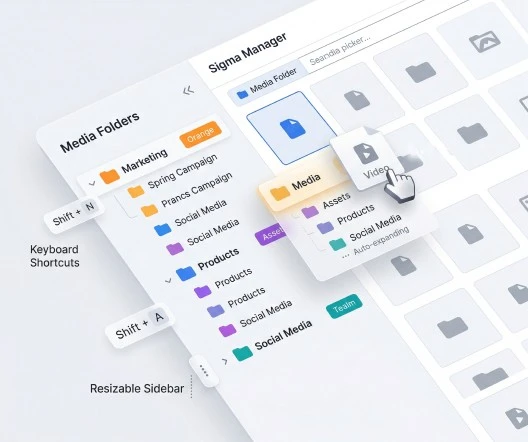
Sigma Media Manager adds a complete folder system to the WordPress media library, so you can organize files however you want. Create unlimited folders and nested subfolders for images, videos, documents, and other assets.
Learn more on the File manager page.
- Create unlimited WordPress media library folders
- Organize files using nested folder structures
- Drag and drop files between folders
- Reorder folder structures instantly
- Assign colors to folders for visual organization
- Auto-expand folders during navigation
- Keyboard shortcuts for faster media management
- Resizable sidebar for better workspace control
- Fully compatible with the native WordPress media picker
Bulk AI Metadata Generation for Images
Images need proper titles, captions, and alt text for accessibility and SEO. Sigma Media Manager’s AI metadata generator creates optimized metadata for your library— process everything or selected folders, skip completed items, and preview before save.
- Generate image titles using AI
- Automatically create captions and alt descriptions
- Process entire media libraries or selected folders
- Skip images that already contain metadata
- Preview and edit generated text before saving
- Maintain consistent SEO-optimized descriptions

Bulk Delete Unused Media Files
Over time, sites accumulate unused WordPress media. Sigma Media Manager scans your WordPress media library, finds files not referenced in posts or pages, lets you preview them, and deletes in bulk—freeing storage and improving performance.
- Scan the entire media library for unused files
- Detect files not referenced anywhere on your site
- Preview unused files before deleting them
- Select specific files or delete all unused media
- Bulk delete files instantly

Automatic WordPress Media Organization
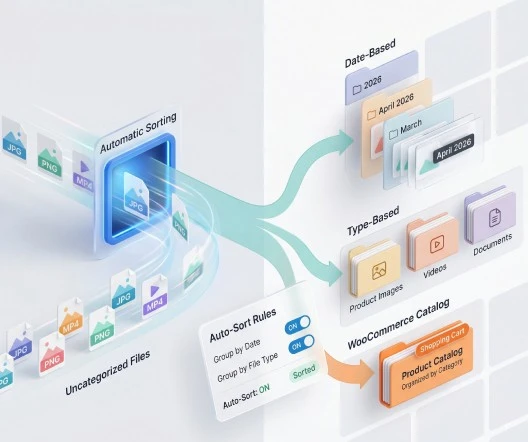
Manual sorting at scale is slow. Sigma Media Manager keeps your WordPress media library organized as new files arrive—group by upload date or type, organize uncategorized media, and keep WooCommerce catalogs tidy.
- Automatically group files by upload date or type
- Organize uncategorized media into folders
- Improve discoverability for editors and teams
- Perfect for WooCommerce stores with large image catalogs
- Maintain a clean and structured media library
Flexible Media Library Views
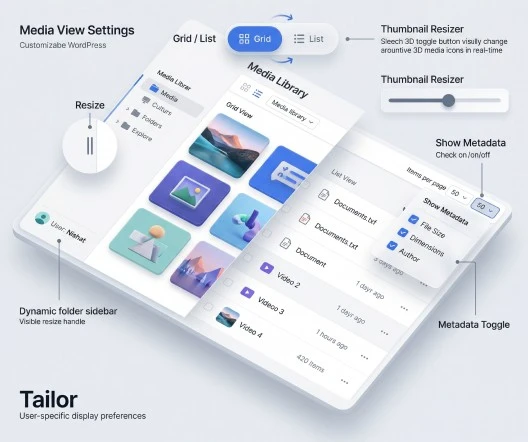
Tailor how your WordPress media library is displayed—grid or list, items per page, thumbnail sizes, sidebar width, metadata visibility, and user-specific preferences.
- Toggle between grid view and list view
- Control the number of media items per page
- Adjust thumbnail sizes for easier browsing
- Resize the folder sidebar panel
- Show or hide file metadata
- User-specific display preferences
Cloud Storage Offload
Large libraries consume server disk. Sigma Media Manager offloads media to scalable cloud storage and rewrites URLs so visitors get fast delivery—pair with a CDN for global performance. Details: Media offload.
Supported providers
- Amazon S3
- Cloudflare R2
- DigitalOcean Spaces
- Google Cloud Storage
Benefits
- Reduce server storage usage
- Lower hosting costs
- Deliver media through CDN networks
- Improve global website performance
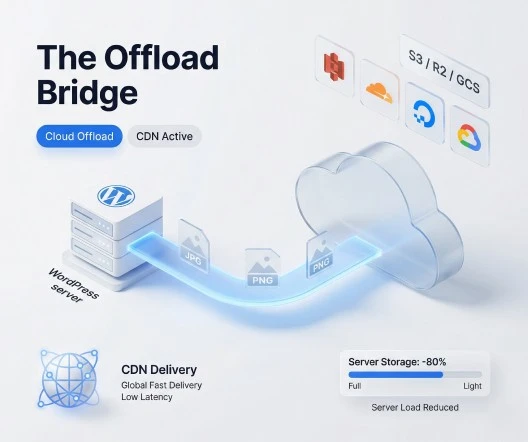
Image Optimization for Faster Websites
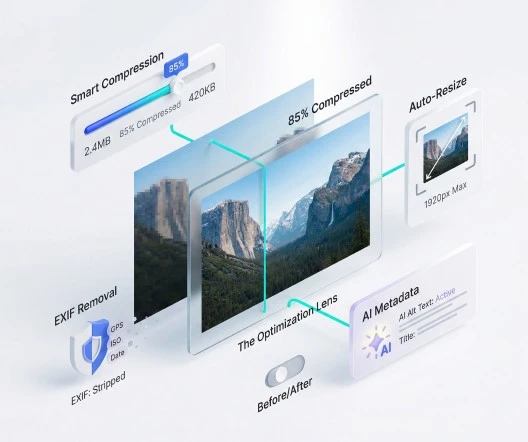
Images are often the heaviest assets. Sigma Media Manager includes image optimization: JPEG/PNG compression, resize on upload, EXIF removal, plus AI metadata. More on the Image optimizer page.
- JPEG and PNG compression
- Automatic image resizing on upload
- EXIF metadata removal
- AI-generated image metadata
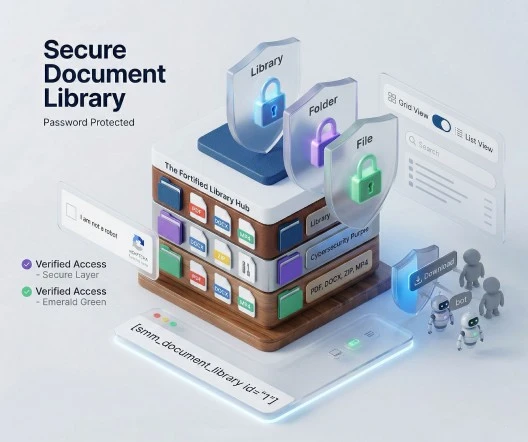
WordPress Document Library with Security Protection
Share files professionally with multiple libraries, folders, shortcodes, grid/list layouts, and search. Full walkthrough: Document library and Security.
Shortcode
[smm_document_library id="YOUR_LIBRARY_ID"]Security features
- Password-protected document libraries
- Folder-level and file-level password protection
- Captcha verification (reCAPTCHA, Turnstile, hCaptcha)
- Restrict allowed upload file types
- Prevent automated download spam
Supported formats include PDF, DOCX, XLSX, PPTX, MP4, ZIP, images, audio, and more.
Sigma Media Manager vs Other WordPress Media Library Plugins
| Feature / Capability | Sigma Media Manager | FileBird | HappyFiles |
|---|---|---|---|
| Media Library Folders | |||
| AI Metadata Generation | |||
| Delete Unused Media | |||
| Automatic Media Organization | |||
| Cloud Storage Offload | |||
| Document Library System |
Sigma Media Manager Is Perfect For
Sigma Media Manager is ideal for:
- WordPress agencies managing multiple websites
- WooCommerce stores with large product image libraries
- Bloggers and content publishers
- Online course creators sharing resources
- Businesses managing internal documents
- Freelancers managing multiple clients’ websites
FAQ
Frequently asked questions
The media library is WordPress’s built-in place for every image, video, and file you upload. Sigma Media Manager extends it with folders, AI metadata, cleanup, cloud offload, optimization, and secure document libraries.
A plugin that improves how you organize and work with uploads—beyond the default flat grid. Sigma Media Manager is an all-in-one plugin for structure, automation, performance, and security.
Use Sigma Media Manager to create unlimited folders and subfolders, drag-and-drop files, color-code folders, and automate grouping by date or type—so teams can find assets quickly.
Yes. Sigma Media Manager adds a full folder system with nesting, keyboard shortcuts, a resizable sidebar, and grid/list views, fully compatible with the native media picker.
Yes. There is no artificial cap on folders or nesting depth.
Yes. It enhances the native library and media picker rather than replacing WordPress’s core upload flow.
Yes. You can organize existing uploads into folders without breaking attachment relationships when you use Sigma Media Manager’s organization tools.
Yes. You can build unlimited nested structures to match your site or team workflow.
Yes. Sigma Media Manager can group uploads by date or file type and help organize uncategorized media—ideal for large catalogs and WooCommerce stores.
Yes. Sigma Media Manager scans for files not referenced in content, lets you preview them, and supports bulk deletion to free disk space.
Run an unused-media scan inside Sigma Media Manager, review the results, then delete selected items or all unused files in bulk.
Yes. AI-generated titles, captions, and alt text help images meet accessibility and SEO best practices, alongside lighter files from optimization.
WordPress and hosting tools handle raw exports; Sigma Media Manager focuses on organization, cloud offload, and cleanup so your library stays manageable at scale.
Yes. Uploads flow through WordPress as usual, while Sigma Media Manager optimizes, tags, and organizes files automatically where you enable those features.
Yes. Organized attachments and metadata work alongside popular gallery and page-builder workflows.
Yes. Folder structure, automation, unused-file cleanup, and cloud offload are built for sites with thousands of assets.
It is the practice of naming, organizing, optimizing, and securing uploads so your site stays fast and your team stays productive.
Yes. Clear folder structures and WordPress roles work together so teams can collaborate in the same library.
Sigma Media Manager is designed to be lightweight on the front end; heavy work like AI and optimization runs in ways that keep visitor-facing pages fast—especially with offload and image optimization enabled.
Yes. It integrates with common builders such as Elementor, Gutenberg, Divi, and Bricks and keeps the native media picker working.
Yes. Create multiple libraries, use shortcodes to embed them, and apply passwords, Captcha, rate limits, and upload restrictions. See the Document library and Security feature pages for detail.
Replace five plugins with one workflow
Sigma Media Manager replaces separate tools for folders, AI metadata, unused-file cleanup, cloud offload, image optimization, and document security — all from one lightweight WordPress plugin.
- Media Folders
- AI Metadata
- Unused Media Cleanup
- Cloud Offload
- Image Optimization
- Document Security