
WordPress Image Optimizer — Compress & Optimize Images Automatically
Reduce image file sizes, resize oversized uploads, strip hidden EXIF data, and generate SEO-friendly alt text — all directly inside your WordPress media library.
Compression
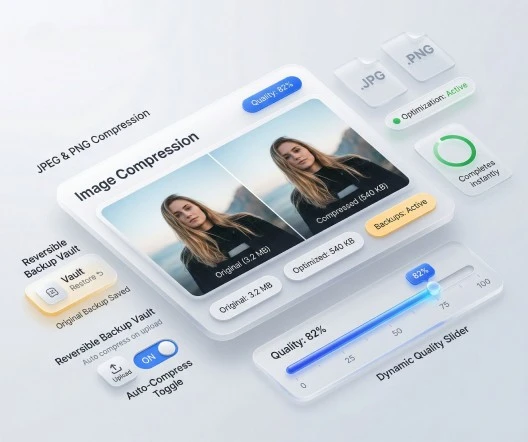
Compress JPEG & PNG Images Without Losing Quality
Built-in WordPress image compression with a quality slider — most sites land between 75 and 85 for visually lossless output and large file-size savings.
Compression runs in the background on every upload, so editors and clients never have to think about file size again.
- Enable compression for JPEG and PNG across the entire library
- Auto-compress on upload — no extra clicks for editors
- Keep original files as backup for full reversibility
- Fine-tune quality from 0–100 to balance size and sharpness
- Re-process older media in bulk from the media library
Auto-resize
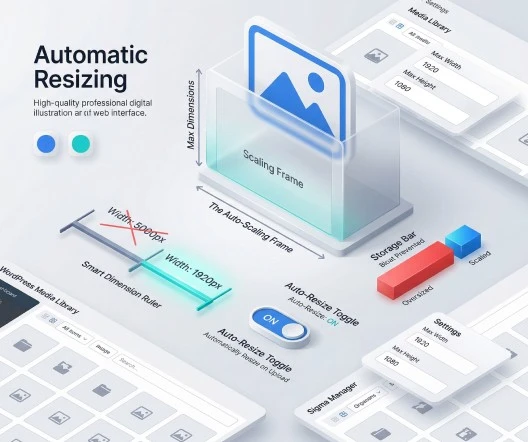
Automatically Resize Oversized Images
Phones and DSLRs export images at 4000–6000 px wide — far larger than any WordPress layout actually displays. Sigma Media Manager scales those uploads down to your maximum dimensions before they ever reach the page.
The result is leaner pages, faster Largest Contentful Paint, and no more manual photo editing for the content team.
- Set a hard maximum width and height for new uploads
- Skip resizing for images already within your size limits
- Maintains aspect ratio — no stretched or squashed photos
- Works alongside compression for the smallest possible files
- Optional: keep original dimensions as a backup
Privacy & cleanup
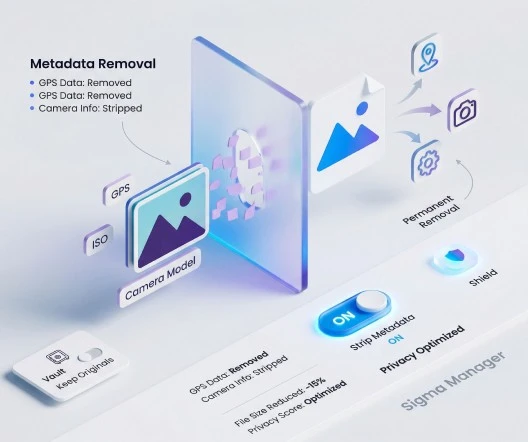
Remove Hidden Metadata from Images
Every photo carries hidden EXIF metadata — camera model, GPS coordinates, device fingerprint, even the editing software used. Publishing it leaks information you probably never intended to share.
Sigma Media Manager strips that metadata on upload, shaves a few extra kilobytes off every image, and keeps an original backup if you ever need it back.
- Strip GPS coordinates so location isn't exposed
- Remove camera, lens, and editing-software fingerprints
- Reduce file size with no visible quality change
- EXIF removal is permanent unless 'keep originals' is enabled
- Especially useful for editorial, eCommerce, and client work
AI metadata
Generate Image Titles, Captions & Alt Text with AI
Search engines and screen readers depend on alt text, titles, and captions to understand your images. Sigma Media Manager generates all three with AI — in bulk, with tone control, and without overwriting fields you already filled in by hand.
Bring your own key for OpenAI, Gemini, or Claude, or start with the bundled free credits to see results before committing to a provider.
- Providers: bundled free credits, Gemini, OpenAI, or Claude
- Tone control: professional, friendly, or SEO-focused
- Process only empty fields — never overwrites manual edits
- Generate titles, alt text, captions, and descriptions in one pass
- Bulk-process the entire library or scoped folders

Why it matters
All-in-one image optimization, built into the media library
Most WordPress image plugins stop at compression. Sigma Media Manager combines compression, resizing, EXIF cleanup, AI SEO metadata, folders, cloud offload, and document libraries — so you replace several plugins with a single, predictable workflow.
Faster Core Web Vitals
Smaller, right-sized images shrink LCP and total page weight — the biggest performance win for most WordPress sites.
Better SEO & accessibility
AI-generated alt text, captions, and titles improve image search visibility and screen-reader experience without manual data entry.
Safer uploads
EXIF stripping removes camera, GPS, and device metadata before publishing — useful for editorial, eCommerce, and privacy-sensitive sites.
Replace four image tools at once
Compression, auto-resize, EXIF cleanup, and AI alt text usually require four separate plugins. Sigma Media Manager bundles them with the rest of the media toolkit — one licence, one update cycle, one place to configure everything.
Related capabilities
- Cloud offload — Send optimized images to S3, R2, or Spaces and serve via CDN.
- File manager — Organize the optimized library with folders, colors, and search.
- Document library — Protect downloads with passwords and shortcode-embedded libraries.
FAQ
Image optimizer questions, answered
At the default 75–85 quality range, compression is visually lossless for most photos and screenshots. You can adjust the slider per site, and you can keep originals as backup so any change stays reversible.
JPEG and PNG are compressed by default. The auto-resize, EXIF cleanup, and AI metadata steps work across all common WordPress image formats handled by the native media library.
Both. Compression, resizing, and EXIF stripping run automatically on new uploads, and you can re-process older images in bulk from the media library at any time.
Only if you choose to. Sigma Media Manager keeps a backup of the original by default, so you can restore the unmodified file even after compression or EXIF removal.
You can use bundled free credits or bring your own key for Gemini, OpenAI, or Claude. Tone is configurable (professional, friendly, SEO-focused), and you can limit AI to fields that are currently empty.
Yes. Because Sigma Media Manager works at the WordPress media-library level, WooCommerce product galleries, variation images, and thumbnails are all optimized automatically.
Replace five plugins with one workflow
Sigma Media Manager replaces separate tools for folders, AI metadata, unused-file cleanup, cloud offload, image optimization, and document security — all from one lightweight WordPress plugin.
- Media Folders
- AI Metadata
- Unused Media Cleanup
- Cloud Offload
- Image Optimization
- Document Security