
WordPress Document Library – Organize, Protect & Share Files in WordPress
Create structured WordPress document libraries with folders, password protection, and searchable downloads. Display libraries anywhere on your site using a simple shortcode — a complete WordPress document management plugin built directly into your dashboard.
More Than a Media Library — A Complete WordPress Document Management System
Sharing documents on WordPress has always been difficult. Files get buried inside the media library, download links are unsecured, and there is little structure for organizing content.
Sigma Media Manager changes this by adding a dedicated WordPress document library system directly inside your dashboard. With a single toggle, you gain structured libraries with their own folders, security settings, and front-end display options.
- No external tools or third-party platforms
- No scattered download links across posts
- Everything runs inside WordPress
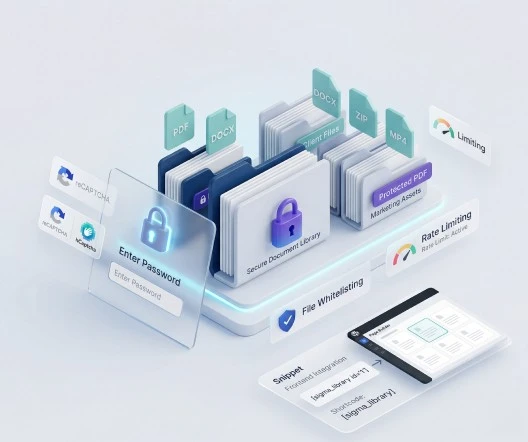
Create and Manage Multiple WordPress Document Libraries
Sigma Media Manager allows you to create multiple WordPress document libraries, each acting as its own organized collection of files.
Every library can have its own folder structure and can be embedded anywhere on your website using a shortcode. This transforms WordPress into a powerful WordPress file management plugin capable of organizing resources, downloads, documentation, and client files.
- Independent folder structures per library
- Embed each library with its own shortcode
- Grid or list layout for front-end display
- Built-in search and filtering for visitors
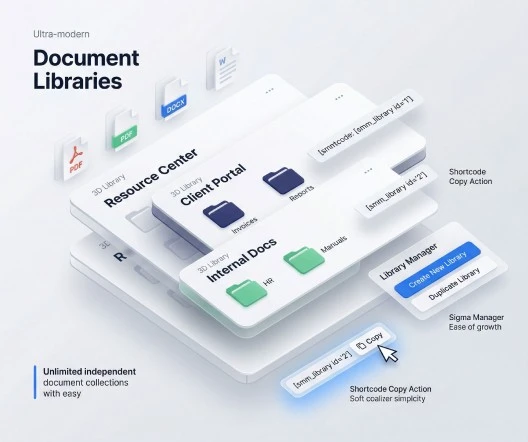
How to Create a WordPress Document Library
- Create a Library — Go to Media → Document Library and click Add New.
- Add Documents — Upload files directly or choose from your existing media library. Organize documents into folders.
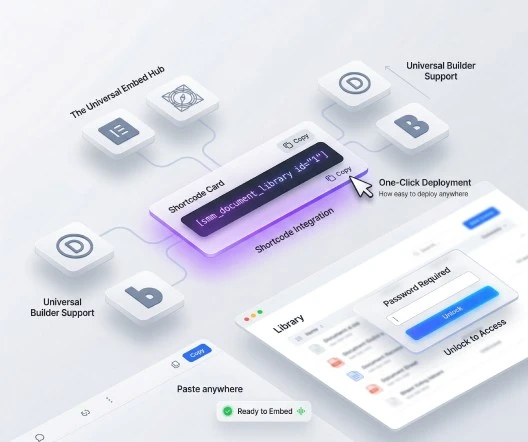
- Display the Library — Embed with the shortcode below. Search and filtering appear automatically on the front end.
[smm_document_library id="YOUR_LIBRARY_ID"]Key features
- Create multiple independent WordPress document libraries
- Upload new files or use existing files from the media library
- Organize documents into folders within each library
- Display libraries anywhere using a shortcode
- Choose between grid or list layout for front-end display
- Built-in search and filtering for visitors
- Clean front-end interface for browsing and downloading
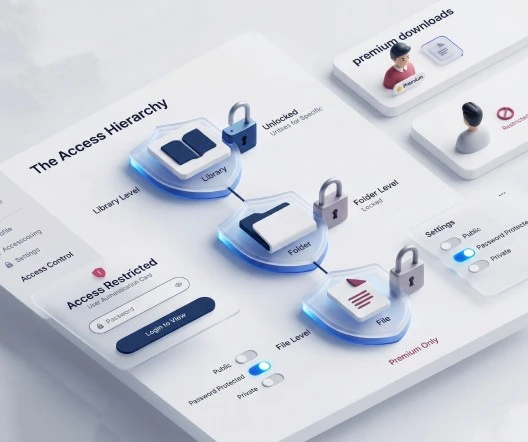
Control Who Can Access Your Documents
Not every document should be publicly accessible. Some files need to be shared only with clients, team members, or specific users. Sigma Media Manager includes built-in security that lets you control access to your WordPress document library.
Password protection levels
- Library-level — Lock the entire library with a single password
- Folder-level — Protect individual folders while keeping others public
- File-level — Per-file passwords for premium assets and sensitive documents
Combine protection levels to create highly controlled document access — ideal for premium downloads, client-only resources, and member portals.
Stop Bots and Protect Your Downloads
Public document libraries can attract automated bots that abuse download links. Sigma Media Manager includes built-in Captcha protection to ensure only real users can access protected files or trigger downloads.
Using Captcha together with password protection creates a powerful two-layer security system for your WordPress document library. Learn more on the Security & Spam Protection page.
- Verification for password-protected content
- Protection against automated downloads
- Google reCAPTCHA, Cloudflare Turnstile, and hCaptcha support
- Works alongside passwords for layered defense

Supported File Types
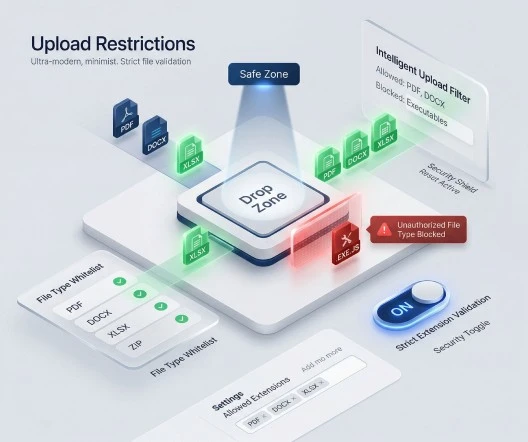
Sigma Media Manager gives you full control over the types of files that can be uploaded to your document libraries. Restrict uploads to only the file types your workflow requires — keeping your WordPress document library organized and secure, especially when multiple contributors upload files.
Documents
pdf, doc, docx, xls, xlsx, ppt, pptx, txt, rtf
Images
jpg, jpeg, png, gif, webp, svg
Audio
mp3, wav, ogg, m4a
Video
mp4, webm, mov, avi
Archives
zip, rar, 7z, tar, gz
Restricting file types prevents unsupported or harmful files from entering your document library.
Why Teams Choose Sigma Media Manager for WordPress Document Libraries
A complete WordPress document management system that replaces scattered plugins and external tools with one integrated solution.
Structured sharing
Create multiple libraries with organized folders for clean file management.
Secure access
Password protection at the library, folder, and file level.
Bot protection
Captcha verification prevents automated downloads and abuse.
Controlled uploads
Restrict file types to maintain a clean and secure document system.
Easy front-end display
Embed document libraries anywhere using a single shortcode.
Fast document discovery
Built-in search and filtering help visitors find files instantly.
All-in-one solution
A complete WordPress document management system built into your dashboard.
Popular Uses for a WordPress Document Library
Sigma Media Manager works as a flexible WordPress resource library plugin for any site that needs structured document sharing.
Agencies & Freelancers
Create secure client portals to share deliverables, reports, proposals, and project documents.
Educators & Course Creators
Organize course materials, reading resources, and assignment files into structured libraries.
Businesses & Teams
Publish internal documentation, company resources, and compliance files with controlled access.
WooCommerce Store Owners
Provide product manuals, downloadable resources, installation guides, and support files.
Frequently Asked Questions
Create a library under Media → Document Library, add files and folders, then paste the shortcode [smm_document_library id="YOUR_LIBRARY_ID"] into any page or post. The library appears with built-in search, filtering, and download buttons. Works with Elementor, Gutenberg, Divi, and Bricks.
Yes. Sigma Media Manager supports multi-level password protection: lock the entire library, individual folders, or specific files. You can combine these levels to create highly controlled document access for different user groups.
Documents (pdf, docx, xlsx, pptx), images (jpg, png, webp, svg), audio (mp3, wav, ogg), video (mp4, webm, mov), and archives (zip, rar, 7z). Administrators can restrict uploads to only the types their workflow requires.
Yes. Captcha adds a second layer of verification alongside passwords. Supports Google reCAPTCHA, Cloudflare Turnstile, and hCaptcha for maximum flexibility.
Absolutely. Each library is its own organized collection with independent folders, security settings, and shortcodes. Create as many as your workflow needs—client portals, resource hubs, internal docs, and more.
Replace five plugins with one workflow
Sigma Media Manager replaces separate tools for folders, AI metadata, unused-file cleanup, cloud offload, image optimization, and document security — all from one lightweight WordPress plugin.
- Media Folders
- AI Metadata
- Unused Media Cleanup
- Cloud Offload
- Image Optimization
- Document Security